

This is Part 4 of The Architecture of Agency, a 5-part series translating Agentic AI jargon into the software architecture paradigms you already know.
Congratulations. Your Acme Corp support bot works. It reads the real refund policy. It checks the customer’s actual billing status. It thinks step by step before making decisions. It has guardrails that prevent catastrophic refunds and traces that let you audit every choice it makes. The VP of Customer Experience has stopped making emergency Slack calls.
And now everyone wants one.
The VP of Sales wants an agent that qualifies leads, drafts proposals, and updates the CRM. HR wants an agent that screens resumes and answers employee policy questions. Legal wants an agent that reviews contracts and flags non-standard clauses. Your Head of Engineering sketches out a multi-agent system on a whiteboard a Support Agent, a Sales Agent, a Legal Agent, all coordinating to handle a complex customer issue that touches billing, contract terms, and a pending sales renewal.
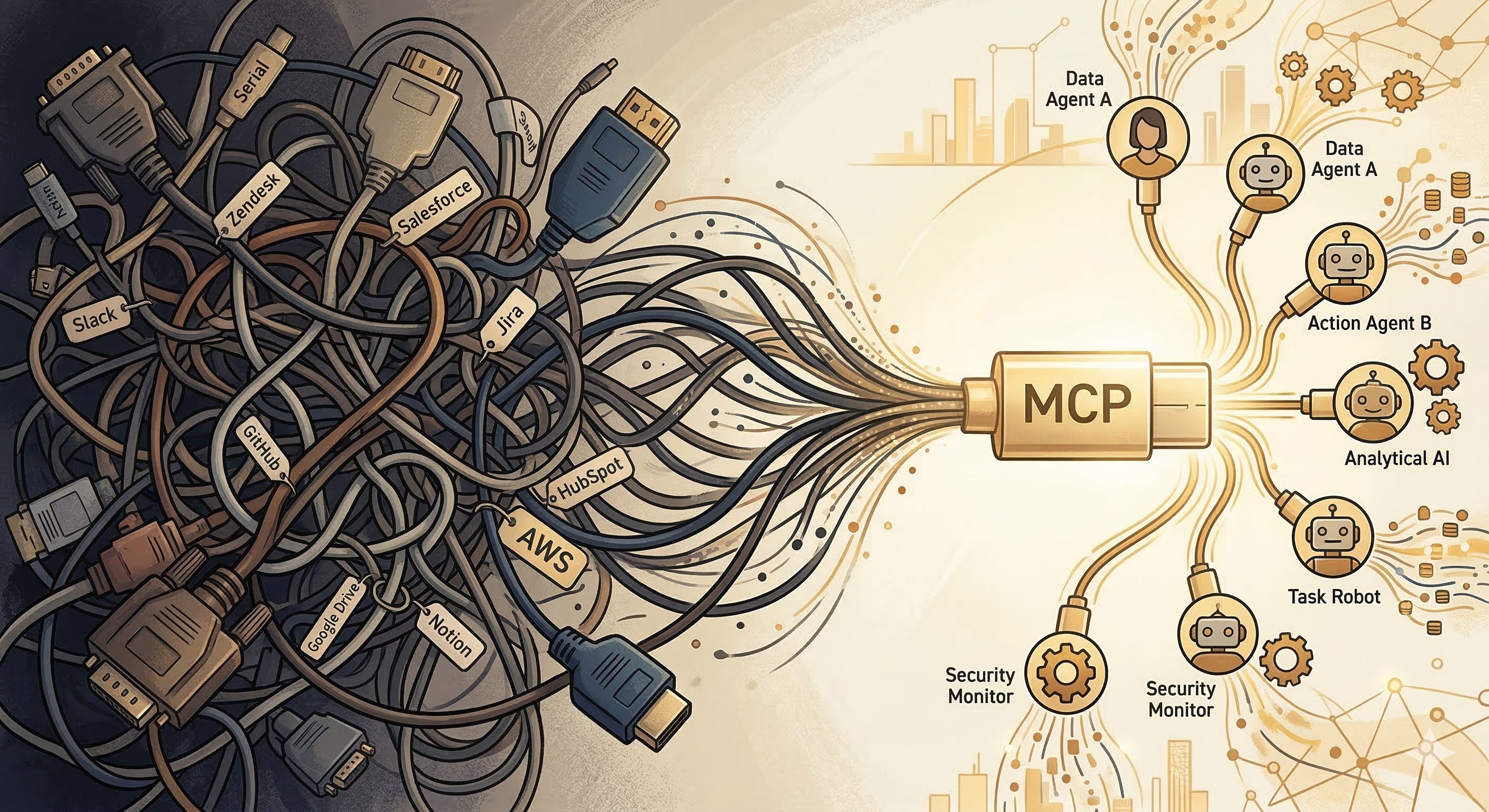
You look at the whiteboard and realize you have a problem. Each agent needs to connect to different tools. The Support Agent talks to Zendesk; the Sales Agent talks to Salesforce; the Legal Agent talks to your contract management system. Right now, every tool connection is a bespoke integration custom code that translates between the model’s tool-calling format and the specific API of each service.
If you build it this way, you’re going to end up with a maintenance nightmare. Every new tool requires custom integration code. Every API change breaks an agent. Every new agent needs its own set of custom connectors. You’ve seen this movie before. It’s the microservices spaghetti problem, and it nearly killed your backend architecture in 2018.
What you need is a standard. A universal connector. A USB-C for agents.
Model Context Protocol: The Universal Tool Connector
Model Context Protocol (MCP), introduced by Anthropic in late 2024, is the closest thing the industry has to that universal connector. And the analogy to USB-C is almost too perfect to be a metaphor.
Remember what computing looked like before USB-C? Every device had its own proprietary connector. Your phone used one cable, your laptop used another, your camera used a third. Every new device meant a new cable, a new adapter, a new drawer full of tangled wires you couldn’t identify. USB-C said: “One connector. One protocol. Everything plugs in the same way.”
MCP does the same thing for AI agents and tools.
Before MCP, connecting an agent to a tool meant writing custom integration code for each combination. Claude talks to Slack one way. GPT-4 talks to Slack a different way. Gemini talks to Slack yet another way. Now multiply that by every tool in your enterprise Jira, Salesforce, GitHub, your internal billing system, the employee handbook and you’ve got an integration matrix that grows quadratically.
MCP standardizes the connection. A tool exposes itself as an MCP server with a standard interface: here are my capabilities, here’s how to call them, here’s what I return. An agent connects as an MCP client. Any MCP client can talk to any MCP server. One protocol. One connector. Everything plugs in the same way.
For engineers, think of MCP as a Language Server Protocol (LSP) for AI. LSP standardized how code editors talk to language-specific tooling. Before LSP, every editor needed a custom plugin for every language. After LSP, one standard protocol connected any editor to any language server. MCP is that same architectural pattern applied to AI agents and external tools.
The practical impact is enormous. Your Support Agent needs Zendesk? There’s an MCP server for Zendesk. Your Sales Agent needs Salesforce? Same protocol, different server. Your Legal Agent needs your internal contract system? Build one MCP server for it, and every agent in your organization can use it. When your Zendesk integration changes, you update one MCP server instead of updating every agent that talks to Zendesk.
The Bioptic Lens
I feel this one in my bones, because standardized interfaces are the story of accessibility.
Before accessibility standards like WCAG and ARIA, every website was a bespoke experience for assistive technology. My screen magnifier had to figure out each site’s unique layout. My VoiceOver had to guess at the meaning of unlabeled buttons. Every new website was a new puzzle. “Is that a button or a decorative element? Let me click it and find out.”
WCAG and ARIA said: “Here is a standard way to describe your interface so that assistive technology can understand it.” A button declares itself as a button. A navigation menu declares itself as a navigation menu. The screen reader doesn’t have to guess.
MCP is ARIA for agents. A tool declares its capabilities in a standard format so that agents don’t have to guess. The parallels run deep: just as ARIA made the web accessible to people with different ways of seeing, MCP makes the tool ecosystem accessible to agents with different architectures.
When I say accessibility isn’t a sidebar in this series it’s the lens this is what I mean. The same engineering discipline that makes software usable for humans with diverse needs makes it usable for AI systems with diverse architectures. Universal standards. Clear declarations. No guessing.
MCP in Practice: What It Looks Like
Let me make this concrete with our Acme Corp scenario. Before MCP, connecting the Support Agent to Zendesk required your team to write custom code: parse the model’s tool-call output, map it to Zendesk’s API, handle authentication, manage errors, format the response back for the model. Then you did the exact same thing for Salesforce, for your internal billing system, for every tool.
With MCP, someone (maybe your team, maybe Zendesk, maybe a community contributor) builds a Zendesk MCP server once. That server declares: “I can create tickets, update tickets, search tickets, and add comments. Here’s the schema for each operation.” Your Support Agent connects as an MCP client. So does your Sales Agent. So does any future agent you build. The integration exists once and serves everyone.
The protocol also handles something that custom integrations often ignore: capability discovery. An MCP client can ask the server “What can you do?” and receive a machine-readable list of capabilities. This means your orchestration layer can dynamically adapt to available tools. If the Zendesk MCP server gets upgraded with a new “merge tickets” capability, your agents can discover and use it without a code change on the agent side.
For the enterprise architecture crowd, this is service discovery meets API versioning meets self-documenting interfaces all in a single protocol. It’s the kind of infrastructure investment that feels slow at first but pays compound returns as your agent ecosystem grows.
Agent-to-Agent Protocol: When Agents Need to Collaborate
MCP connects agents to tools. But what about connecting agents to each other?
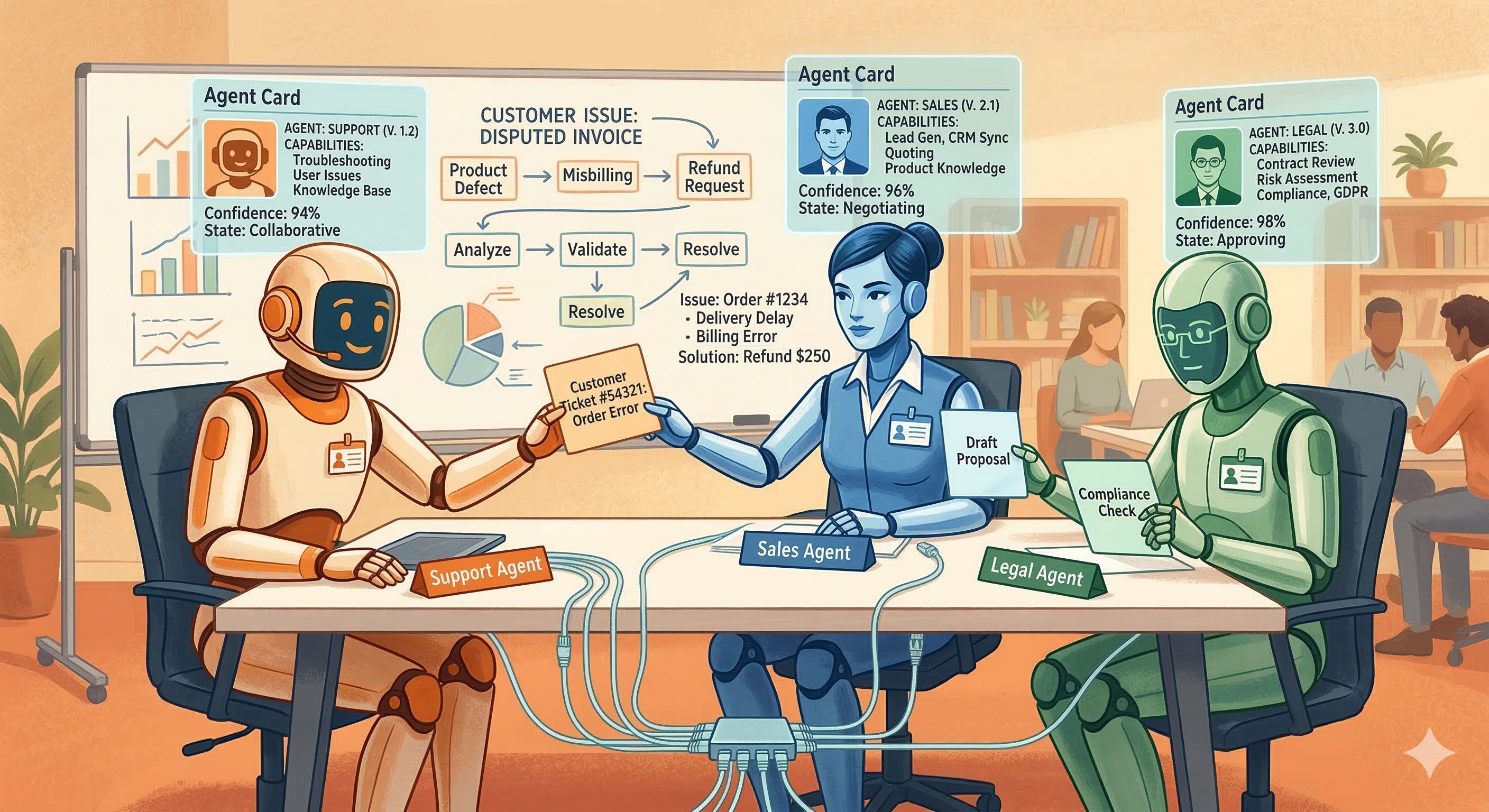
Your Head of Engineering’s whiteboard dream a Support Agent, Sales Agent, and Legal Agent coordinating on a complex customer issue requires something MCP wasn’t designed for. MCP is a client-server protocol. The agent is the client; the tool is the server. But when two agents need to collaborate, neither one is purely a client or a server. They’re peers. They need to negotiate, delegate, and share results.
This is where Agent-to-Agent Protocol (A2A), introduced by Google, enters the picture. If MCP is USB-C (connecting devices to peripherals), A2A is Ethernet (connecting devices to each other).
A2A defines how agents discover each other, describe their capabilities, negotiate tasks, and exchange results. Each agent publishes an “Agent Card” a machine-readable description of what it can do, what inputs it expects, and what outputs it produces. When the Support Agent encounters a contract question, it discovers the Legal Agent via its Agent Card, sends a task request, and receives a structured response.
Think of it as service discovery plus a task protocol. In microservices terms, the Agent Card is the service’s API documentation, A2A task negotiation is the request/response cycle, and the whole thing runs over a standardized protocol that any agent can speak.
This is still early-stage technology. As of early 2026, A2A is gaining traction but isn’t as universally adopted as MCP. The vision is compelling: a future where agents from different vendors, built on different models, can collaborate on tasks the same way microservices from different teams collaborate in a well-architected backend. Whether that vision materializes depends on adoption which depends on whether the protocol solves real problems better than custom integrations.
Memory Architecture: Giving Agents a Past
In Parts 1 through 3, every agent interaction was essentially stateless. The model received a context window, did its work, and the context was discarded. The next customer who walked in got a brand-new agent with no memory of anything that happened before.
For a simple support bot, that’s fine. But for the multi-agent enterprise system we’re building, amnesia is a fatal flaw. The Sales Agent needs to remember that this customer had a billing dispute last month. The Support Agent needs to remember that it already verified this customer’s identity in the first message. The Legal Agent needs to recall the precedent it found in a similar contract review two weeks ago.
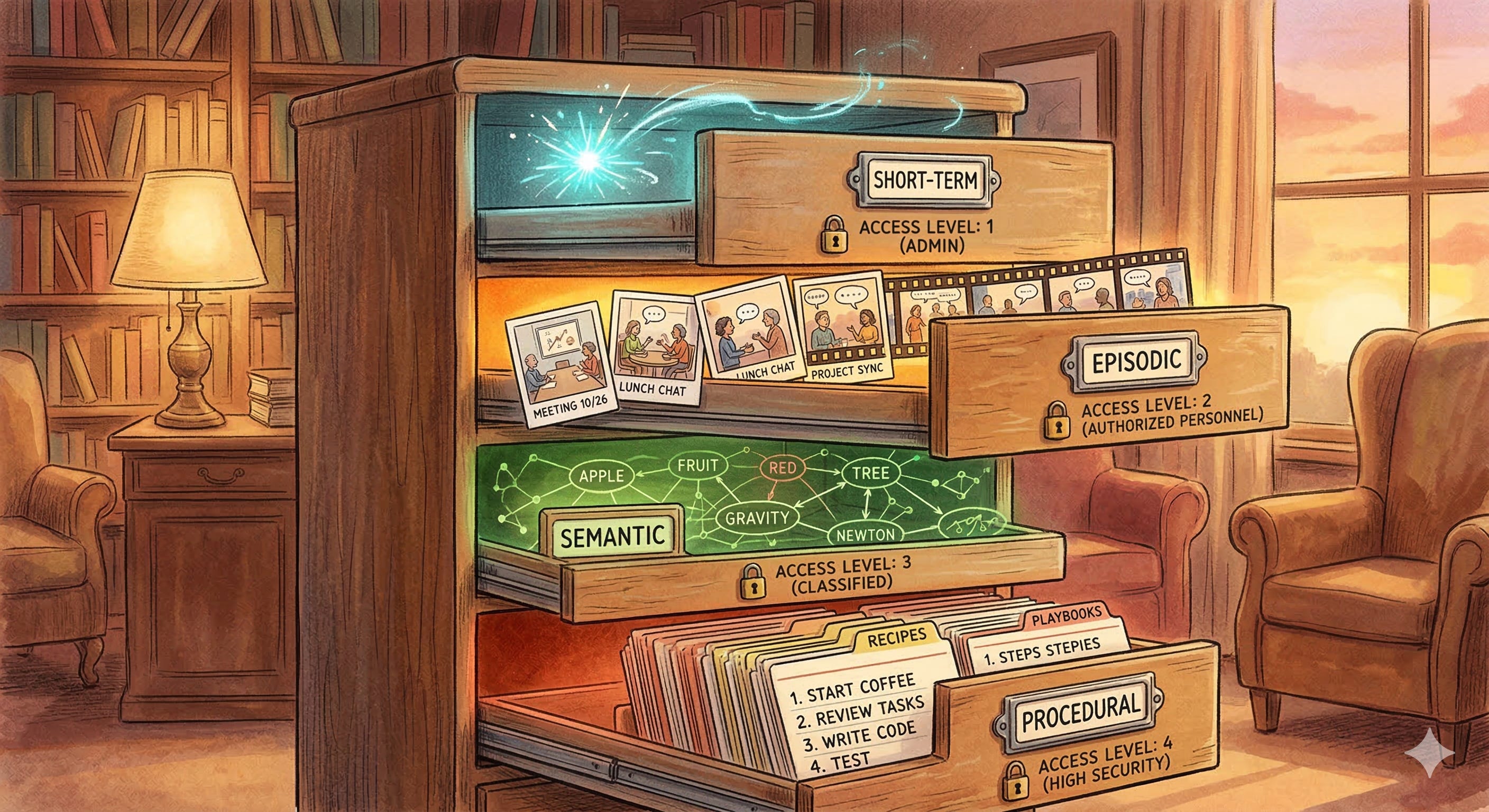
Agent memory isn’t a single technology. It’s an architecture with distinct layers, each serving a different purpose.
Short-term memory is the context window itself the conversation history and injected data that the model can see right now. This is working memory. It’s fast, high-fidelity, and ephemeral. When the conversation ends, it’s gone.
Episodic memory captures specific past interactions. “Last Tuesday, customer ACM-7742 called about a billing discrepancy. The issue was resolved by applying a $50 credit.” Episodic memories are stored in a database and retrieved when relevant essentially RAG applied to the agent’s own history.
Semantic memory captures general knowledge extracted from past experiences. “Customers who mention ‘switching to a competitor’ are 3x more likely to churn within 30 days.” This isn’t a specific interaction it’s a pattern distilled from many interactions. Semantic memory informs the agent’s reasoning without requiring it to replay individual episodes.
Procedural memory captures learned workflows. “When a customer requests a refund and their account is past due, always check for outstanding payment plan agreements before processing.” This is the agent’s institutional knowledge the kind of wisdom that experienced employees accumulate over years and new hires lack.
The Bioptic Lens
Memory architecture is where the bioptic metaphor comes full circle.
I’ve been navigating code with limited vision for thirteen years. Over that time, I’ve built procedural memory that compensates for what I can’t see. I know that when a test fails with a null pointer exception, the bug is almost always in the data setup, not the assertion. I know that when a function is longer than my magnifier’s viewport, the invariant I need to check is usually near the top. I know that when a code review comment says “looks fine,” the reviewer probably skimmed it because I can’t skim, and I find bugs they miss.
None of this knowledge is in my immediate field of vision. It’s in my memory accumulated over thousands of interactions, compressed into heuristics, stored outside the “context window” of whatever I’m looking at right now. Without it, I’d have to re-learn how to debug every single day. With it, I can operate at a level that sometimes surprises people who assume low vision means low capability.
Agents without memory are in the same position. They start every interaction as a brilliant stranger with amnesia. Building memory architecture is how you turn that stranger into an experienced colleague who gets better over time not because the model is “learning” (remember the Learning Illusion from the pre-series article), but because the system is accumulating and retrieving the context the model needs.
Building Memory That Scales: The Engineering Reality
Building agent memory isn’t just a data modeling exercise it’s an infrastructure challenge that touches retrieval, storage, and privacy.
Episodic memory is the most straightforward to implement. Each agent interaction produces a structured record: timestamp, customer ID, agent ID, summary, outcome, reasoning trace. Store these in a database (relational or document store) and build a retrieval layer that can fetch relevant episodes given the current context. The RAG pipeline from Part 2 works here you’re just pointing it at the agent’s own history instead of a document library.
Semantic memory is harder because it requires extraction and generalization. You don’t want to retrieve a hundred past interactions about billing disputes; you want the distilled insight: “Customers who escalate billing disputes within the first two messages are 4x more likely to churn.” Building this layer requires periodic batch processing analyzing interaction logs, extracting patterns, and updating a knowledge graph or summary store that agents can query.
Procedural memory is the most organizational and the least technical. It’s the playbooks, the standard operating procedures, the “tribal knowledge” that experienced employees carry. In practice, procedural memory often starts as hand-authored documents maintained by subject matter experts your best support reps write down how they handle the tricky cases, and those documents become part of the agent’s RAG knowledge base. Over time, you can augment this with patterns extracted from successful interactions, but the starting point is human expertise captured in text.
The privacy implications of memory are significant and easy to overlook. If your Support Agent remembers that customer ACM-7742 mentioned they were going through a divorce in a previous call, should the Sales Agent have access to that memory? Should the agent retain it at all? Memory architecture needs access controls that mirror your data governance policies agent-specific memory, shared memory, and memory that gets automatically purged after a retention period.
Agent Identity and Security: Who Are You, and What Can You Touch?
Here’s a question that keeps security architects up at night: if an agent can call your billing API, who is making that call?
In a human workforce, the answer is clear. Sarah from Accounting has an employee badge, an Active Directory account, and a set of permissions that let her access billing systems but not HR records. When she makes a change, the audit log records Sarah made the change. If she leaves the company, her access is revoked.
Agents need the same infrastructure. An agent is not a human, but it’s acting on behalf of a human (or a process), and it needs an identity that the rest of your systems can authenticate, authorize, and audit.
Authentication answers “Who are you?” The agent needs credentials API keys, OAuth tokens, or service account identities that prove it is the Support Agent and not a rogue process pretending to be one.
Authorization answers “What can you touch?” The Support Agent can read customer records and issue refunds up to $100. It cannot modify customer records, access employee data, or issue refunds over $100 without human approval. These permissions should be defined in your existing IAM infrastructure, not hardcoded in the agent’s system prompt.
Audit answers “What did you do?” Every tool call, every data access, every decision should be logged with the agent’s identity attached. When the CFO asks “Who approved this refund?”, the answer should be traceable: “The Support Agent (service account support-agent@acme.com) issued the refund based on reasoning trace #4472, which was reviewed and approved by the output guardrail policy v2.3.”
The principle here is the same one that governs human access: least privilege. Give the agent the minimum permissions it needs to do its job, and nothing more. This isn’t just good security practice it’s a guardrail. An agent that can’t delete customer records can’t accidentally delete customer records, no matter how creative its reasoning gets.
Multi-Agent Routing: The Orchestration Layer
You have multiple agents. They have tools, memory, identity, and protocols to communicate. Now you need a traffic controller.
Multi-agent routing is the orchestration layer that decides which agent handles a given task, how tasks flow between agents, and what happens when an agent fails or gets stuck.
The simplest pattern is a router agent a lightweight model or rules engine that classifies incoming requests and routes them to the appropriate specialist. Customer has a billing question? Route to Support Agent. Customer wants to renew their contract? Route to Sales Agent. Customer’s question involves both billing and a contract? Route to Support Agent first, with instructions to hand off the contract portion to Legal Agent.
More sophisticated patterns include hierarchical orchestration (a manager agent that delegates subtasks to worker agents and aggregates results) and collaborative swarms (multiple agents working on the same task in parallel, with a synthesis step that combines their outputs).
The key architectural decision is whether routing is deterministic (rules-based, like a switch statement) or model-based (an LLM deciding which agent to invoke). Deterministic routing is faster, cheaper, and more predictable. Model-based routing handles ambiguity better but introduces the same unpredictability we’ve been wrestling with throughout this series.
Most production systems use a hybrid: deterministic routing for the 80% of cases that are clear-cut, with model-based routing for the 20% that are ambiguous. Sound familiar? It’s the same workflow-vs-autonomy spectrum from Part 2, applied at the orchestration level.
What We Built (And the Final Question)
Let’s look at the complete architecture:
Incoming Request
    → Router (deterministic + model-based)
        → Agent A [Identity: support-agent@acme]
            → MCP: Zendesk, Billing API, Knowledge Base
            → Memory: Short-term + Episodic + Semantic
            → ReAct Loop + Guardrails + Tracing
        → Agent B [Identity: sales-agent@acme]
            → MCP: Salesforce, Pricing Engine
            → A2A: Can delegate to Legal Agent
            → Memory: Shared semantic + agent-specific episodic
        → Agent C [Identity: legal-agent@acme]
            → MCP: Contract Management, Compliance DB
            → Memory: Procedural (contract review playbooks)
    → Aggregation + Output Guardrails
        → Response
This is no longer a chatbot. It’s an enterprise AI system with standardized tool connections (MCP), agent-to-agent collaboration (A2A), persistent memory across sessions, verifiable identity, and intelligent routing.
But there’s one question left the one your VP of Engineering asked at the start: “So what’s our tech stack?”
That’s Part 5. The frameworks, the platforms, and the build-versus-buy decision matrix that determines whether you wire this together with raw code, lean on an orchestration framework, or hand the whole thing to a managed platform.
Or, in bioptic terms: we’ve designed the glasses. We know the prescription, the lens material, the frame geometry. Now we need to decide where to get them made.